

If you run a website, you eventually face Google Analytics 4 — usually with a mix of curiosity and dread. It is powerful, it is free, and it can tell you a great deal about how people find and use your site. It can also overwhelm you with dashboards, dimensions and jargon until you give up and ignore it entirely, which is the worst outcome of all. The good news is that you do not need to master every corner of GA4 to get real value from it. You need to understand how it thinks, and then watch the handful of numbers that actually matter to your business.
This article is general information about marketing and UK rules, not legal advice. For anything specific to your business, check the ICO's guidance or take professional advice.
What it is
Google Analytics 4 (GA4) is the current version of Google's free analytics platform for measuring how people discover and use your website and app. It replaced the long-standing Universal Analytics, which Google retired, so GA4 is now simply the version — there is no opting back into the old one.
Its job is to answer the questions every marketer asks: where do my visitors come from, what do they do once they arrive, and how many of them take the action I care about? Used well, GA4 turns guesswork into evidence and underpins almost everything in our guide to measuring marketing ROI. Used badly, it is a very expensive-looking way to feel busy.
The big shift: an event-based model
The single most important thing to understand about GA4 is how it differs from what came before. The old Universal Analytics was built around sessions and pageviews — it thought in terms of visits and the pages within them. GA4 is built around events.
In GA4, everything a user does is an event: a page view is an event, a click is an event, a video play, a scroll, a form submission, a purchase — all events. This sounds like a technical detail, but it changes how you think:
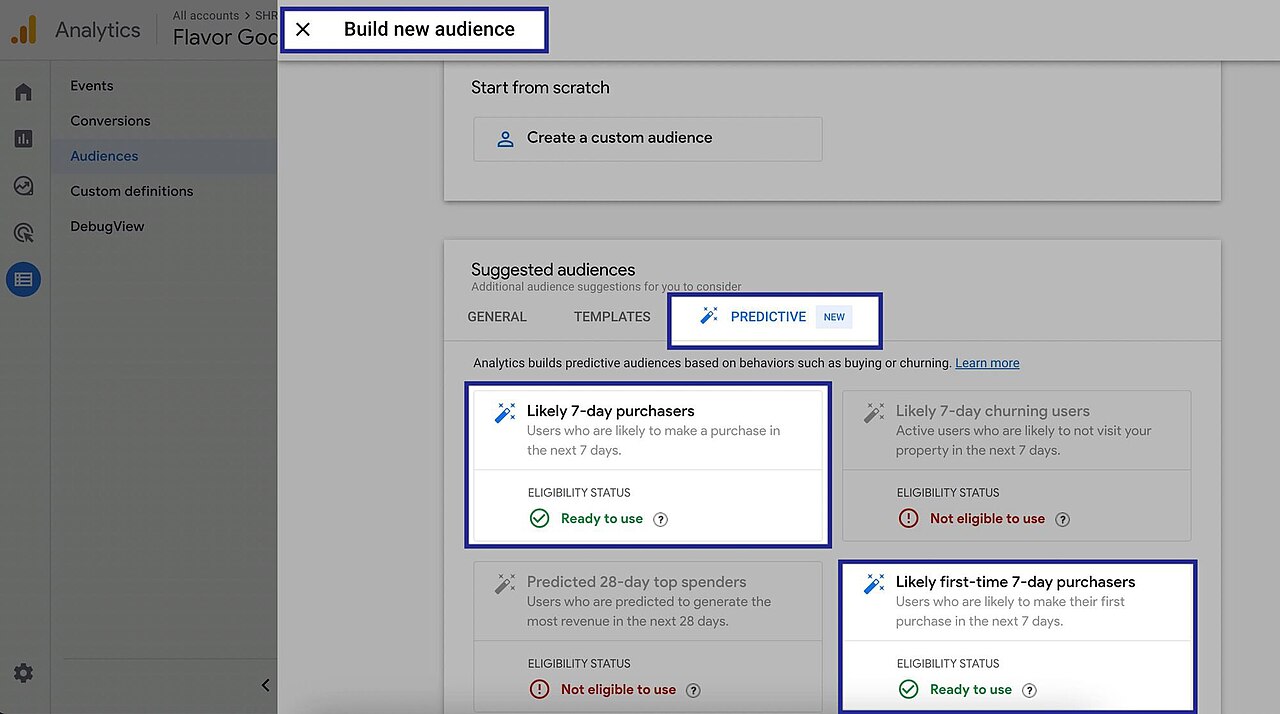
- It is action-focused rather than page-focused. You measure what people do, not just what they see.
- It works across websites and apps together, treating them as one stream of user behaviour rather than separate worlds.
- It is more flexible, because you can define custom events for the specific actions that matter to your business.
If you previously learned analytics the old way, this is the mental adjustment to make. Stop asking "how many pageviews?" and start asking "how many of the actions I care about happened?"
The metrics that actually matter
GA4 offers an enormous number of metrics, and the quickest route to giving up is trying to watch them all. Resist it. A small business needs only a handful of numbers, read regularly:
| Metric | What it tells you |
|---|---|
| Conversions (key events) | How many people did the thing you care about — bought, enquired, signed up |
| Traffic sources | Where visitors come from — search, social, email, ads, direct |
| Engaged sessions | Visits where someone actually paid attention rather than bouncing instantly |
| Users and new users | How many people visit, and how many are seeing you for the first time |
| Engagement rate | The share of sessions that were genuinely engaged |
One change worth noting: GA4 retired the old, much-misunderstood bounce rate in favour of engagement. An "engaged session" is roughly one where the visitor stuck around, interacted or viewed more than one page — a more honest signal than the blunt bounce metric ever was. The lesson is to judge quality of attention, not just raw visits.
Setting it up to be useful
GA4 only tells you what you tell it to track, so a little setup goes a long way:
- Install it properly. Add the tracking to your site, often via a tag manager. If GA4 is not installed correctly, every number after that is unreliable.
- Define your key events. Decide which actions count as success — a purchase, an enquiry, a newsletter sign-up — and mark them as key events. This is what turns raw activity into meaningful results.
- Tag your campaigns. Use consistent campaign tags on your links so GA4 can attribute visits and conversions to the right source. Without this, your email, social and ad traffic blur together.
- Check it agrees with reality. Compare GA4's conversion count against your actual sales or enquiries now and then. Analytics is a model of reality, not reality itself, and small discrepancies are normal.
The aim of all this is not more data; it is trustworthy data on the few things that matter. As the marketing consultancy CM Beyer argues in its piece on keeping marketing measurement simple rather than overcomplicated, a few numbers you trust and act on beat a wall of dashboards nobody ever opens — and GA4 is most useful when you treat it that way.
The UK privacy angle
You cannot talk about analytics in the UK without talking about privacy, because GA4 typically uses cookies and processes personal data about your visitors. That brings it within the same rules as any other tracking:
- PECR (the Privacy and Electronic Communications Regulations) generally requires consent before non-essential cookies are set — and analytics cookies are usually treated as non-essential. So GA4 should normally fire only after a visitor has agreed via a proper cookie banner.
- The UK GDPR governs how you handle the personal data involved, requiring a clear privacy policy and lawful, transparent processing.
Both are enforced by the Information Commissioner's Office (ICO), which publishes specific guidance on cookies and analytics. In practice this means a genuine consent mechanism (one that lets people decline, not just accept) and honesty about what you collect. The same care applies to other tracking on your site, including the conversion pixels used by advertising platforms.
The bottom line
Google Analytics 4 is the current, free version of Google's analytics, built around an event-based model where every user action is recorded as an event, measured across websites and apps and judged by engagement rather than the old bounce rate. Do not drown in its endless metrics: install it correctly, define the key events that represent success, tag your campaigns, and watch a handful of numbers — conversions, traffic sources and engaged sessions — that genuinely guide decisions. And because GA4 handles personal data, respect the UK rules under PECR and the UK GDPR with a real cookie consent banner and a clear privacy policy. Treated this way, GA4 stops being an intimidating dashboard and becomes a quiet, reliable guide to what is actually working.
Frequently asked questions
What is Google Analytics 4?
Google Analytics 4 (GA4) is the current version of Google's free analytics platform for measuring how people find and use your website and app. It replaced the previous version, Universal Analytics, and is built around an event-based model that tracks individual user interactions rather than the older session-and-pageview approach.
How is GA4 different from the old Google Analytics?
The biggest change is the data model. Universal Analytics was built around sessions and pageviews; GA4 records everything as 'events', which gives a more flexible, action-focused view and works across websites and apps together. GA4 also emphasises engagement metrics over the old bounce rate and is designed with privacy controls in mind.
Is Google Analytics 4 free?
Yes, GA4 is free for the vast majority of websites and businesses. There is a paid enterprise tier (Google Analytics 360) aimed at very large organisations with high data volumes and advanced needs, but most small and medium businesses will never need anything beyond the free version.
Do I need consent to use GA4 in the UK?
Generally, yes. GA4 typically uses cookies and processes personal data, so under PECR you usually need consent before the analytics cookies are set, and the UK GDPR governs how the data is handled. In practice that means a compliant cookie consent banner and a clear privacy policy. The ICO provides guidance on cookies and analytics.


Join in — free. Comments on Daily Junction are for members, so real names stay rare and bots stay out.
One field. We email you a 6-digit code — no password needed. Your comment is kept while you do it.
Under 13? You’ll need a parent’s OK first — it takes them one click.